The Memory of PC-1475
Index
The program area
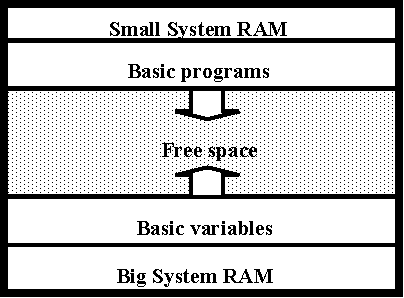
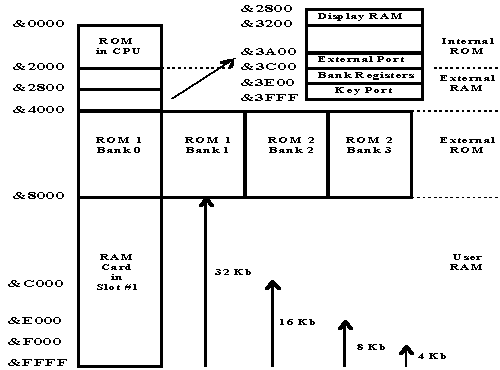
- The program area begins at 32768 and ends at 65535. The inserted memory capacity can have other sizes, so the space is divided into blocks of the size of the
 RAM cards or is using two banks (0 and 1) because it is larger than this area. The area before 32768 belongs to the system. There is the display, the ROM and some ports.
- 8kB card: Beginning of program area at 32768, 40960, 49152 and 57344. All blocks are identical (mapped).
- 16kB card: Beginning of program area at 32768 and 49152.
- 32kB card: Beginning of program area at 32768.
- 2 cards with more than 32kB: Beginning of program area at 32768, but with bank switching the system can access the second card, too. This will make the computer slower!
- The first BASIC line begins at 32817, 41009, 49201 and 57393 (for 8kB card). You can edit this position and make room for data. The memory locations 65495 and 65496 contain this position: PEEK 65495+256* PEEK 65496 = start address. At this address there must be a byte with the value 255, then the first line follows.
- The end of the BASIC area is marked with 255, too. This address is stored in the pointer at 65497 and 65498 (you can read this value at: 10302,10303 and 10558,10559 and 32777,32778, too. These locations are protected by the system.)
- Address of the BASIC ending position = i.e. PEEK 65498*256+ PEEK 65497 always higher than 57393 using 8kB.
- The last byte which can be used for programs without DIM variables is 63951 (-n*8192 /...)!
Line structure:
3 bytes (x,y,z), data, return (Chr 13)
x,y: line number = x*256+y
z: length of data (return included)
End of program Chr (255)
The byte 254 in data of a line means a command which is defined by the following byte.
Variable structure (DIM):
7 bytes (a,b,c,d,e,f,g), Data
In 65502*256+65501 the start address of the variables is stored.
The last position where variables are stored: 63951
Variables are written from behind, this means that a new variable is written before the older variables. The start address points to the header of the newest variable.
You can rename variables using POKE!
Header structure:
7 bytes lengthy
Example: Bytes are named a-g
G$(5,5)*3
a: 71 = G: variable name
b: 160 = String
c: 0 = 1.Byte * 256
d: 111 = + 2.Byte = Overall length + 3 (because of following DIM values)
e: 5 = Dim 5
f: 5 = , 5
g: 3 = * 3
DATA:71= 1. character data
Meaning of the second header byte:
1-26 = Stringarray, 2 character name with second character = Chr (Byte+64)
193-218 = Number array, 2 character name with second char = Chr (Byte-128)
129-154 = String, 2 character name [Chr (Byte-64)] variable (like NE$="test") always 16 bytes lengthy
65-90 = Number, 2 character name [Chr (Byte)] (like AA=0) always 8 byte lengthy
128: One character name number array
160: One character name string array
Data of a variable:
Strings contain each character as a byte in ASCII code, Chr(0) is the end of a string. The Chr(0) is not used when the text is as long as the variable is dimensioned.
Numbers are stored in the BCD format. Each number needs 7 bytes.
In an array the single variables are following without any divider character. The position of such a variable is calculated using the header data.
In a twodimensional array the arrays are following in a similar way: DIM B$(1,2)*1: B$(0,0) B$(0,1) B$(0,2) B$(1,0) B$(1,1) B$(1,2).
Access to the display:
There are 24 characters in two lines, each character has 5*7 pixel and needs 5 bytes. The first bit is the most upper pixel bit 6 the lowest.
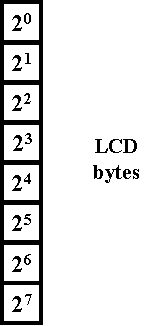 |
SHARP POCKET COMPUTER PC-1475
10240 bis 10299
10496 to 10555 | The first 12 characters of the 1. line
|
10304 bis 10363
10560 to 10619 | The first 12 characters of the 2. line
|
10752 bis 10811
11008 to 11067 | The second 12 characters of the 1. line
|
10816 bis 10875
11072 to 11131 | The second 12 characters of the 2. line
|
|
The symbols BATT, (), HYP, RSV, PRO, RUN and CAL are controlled in byte 10300 or 10556:
 Bit Bit | Symbol |
|---|
| 0 | BATT |
| 1 | () |
| 2 | HYP |
| 3 | RSV |
| 4 | PRO |
| 5 | RUN |
| 6 | CAL |
| 7 | - |
The symbols BUSY, DEF, SHIFT and DBL are controlled in byte 10301 or 10557:
| Bit | Symbol |
|---|
| 0 | BUSY |
| 1 | DEF |
| 2 | SHIFT |
| 3 | DBL |
| 4 | - |
| 5 | - |
| 6 | - |
| 7 | - |
The symbols E, M, RAD, G, MATRIX, STAT and PRINT are controlled in byte 10364 or 10620:
| Bit | Symbol |
|---|
| 0 | E |
| 1 | M |
| 2 | RAD |
| 3 | G |
| 4 | MATRIX |
| 5 | STAT |
| 6 | PRINT |
| 7 | - |
The symbols µt, /|\, SML and DE are controlled in byte 10365 or 10621:
| Bit | Symbol |
|---|
| 0 | µt (jap. symbols) |
| 1 | /|\ (jap. symbol) |
| 2 | SML |
| 3 | DE |
| 4 | - |
| 5 | - |
| 6 | - |
| 7 | - |
System area:
| - | System variables (each 8 bytes long):
| Var | Address | HB | LB |
|---|
| Z | 63952 | 249 | 208 |
| Y | 63960 | 249 | 216 |
| X | 63968 | 249 | 224 |
| W | 63976 | 249 | 232 |
| V | 63984 | 249 | 240 |
| U | 63992 | 249 | 248 |
| T | 64000 | 250 | 0 |
| S | 64008 | 250 | 8 |
| R | 64016 | 250 | 16 |
| Q | 64024 | 250 | 24 |
| P | 64032 | 250 | 32 |
| O | 64040 | 250 | 40 |
| N | 64048 | 250 | 48 |
| M | 64056 | 250 | 56 |
| L | 64064 | 250 | 64 |
| K | 64072 | 250 | 72 |
| J | 64080 | 250 | 80 |
| I | 64088 | 250 | 88 |
| H | 64096 | 250 | 96 |
| G | 64104 | 250 | 104 |
| F | 64112 | 250 | 112 |
| E | 64120 | 250 | 120 |
| D | 64128 | 250 | 128 |
| C | 64136 | 250 | 136 |
| B | 64144 | 250 | 144 |
| A | 64152 | 250 | 152 |
The first byte of each variable is CHR 245 when containing a string or CHR 0 when containing a number. If the string is shorter than 7 characters, a Chr(0) is added at the end!
|
| - | Reserve mode data: 65343:A:first reserve entry, Chr (alphabetical number) marks beginning (A=1,S=19,D=4,...,' '=27,'='=28), then data without any ending code. Example: [1,254,34],[19,...],...
Order:ASDFGHJKL'='' 'MNBVCXZ, empty entries are not stored (not even the start code 1-28!)
|
| - | System addresses:
| LB | HB | Description |
|---|
| &FFD7 | &FFD8 | BASIC start location |
| &FFD9 | &FFDA | BASIC end location |
| &FFDB | &FFDC | Last with MERGE added program block |
| &FF31 | - | EOT Code (SIO) |
| &FF32 | - | Baud rate (SIO) |
| &FF33 | - | F/F interface state |
| &FD04 | - | Input buffer pointer |
| &FFDD | &FFDE | Variable pointer |
| &FF34 | - | CONSOLE value |
&2A7E
or &2B7E | &2A7F
or &2B7F | WAIT counter |
| &FFDD | &FFDE | Variable pointer |
| &FF02 | - | ASCII code of the blinking character |
| &FF00 | &FF01 | Address of the blinking character in the display buffer |
| &FFF6 | &FFF7 | Start of RAM card |
| &FFF8 | &FFF9 | End of RAM card |
| &FE80 | to &FEAF | Content of display in ASCII |
| &FD20 | to &FD6F | Input buffer |
|
| - | The ROM:
The PC-1475 has a ROM, which contains the operating system.
The ROM of the CPU is at &0000 to &1FFF, the banks are at &4000 to &7FFF.
You can change the bank writing the according number (0..7) at the address &3400. If you know the system calls you can use functions of the system!
|
Copyright © Simon Lehmayr (Parts of my page were made with the help of Laurent Duveau)
If this page has no navigation, click here.
Impressum